If you manage a growing art collection, you’ve likely hit a familiar wall. According to the Deloitte Art & Finance Report 2025, 43% of collectors still rely on spreadsheets and 23% on paper files to track their holdings. Only 34% use an art inventory software for collectors, up from 24% in 2023. The gap between what collectors own and what they can account for is widening.
Table of Contents
Why Art Collectors Need Inventory Software
Understanding Art Inventory Software for Collectors
Features Every Art Collector Should Expect
Cloud-Based vs. Desktop: Security, Privacy, and Access
How Art Inventory Software Fits Into a Collector’s Workflow
Common Mistakes Collectors Make (and How to Avoid Them)
How to Choose the Right Art Inventory Software for Your Collection
Best Practices to Keep Your Art Collection Records Accurate Over Time
FAQs
Why Choose an Art Inventory Platform for Your Collection
Take the Next Step with Your Art Collection
Why Art Collectors Need Inventory Software
Consider a collector with 120 works spread across a New York apartment, New Jersey storage facilities, and a London pied-à-terre. Without centralized inventory management, basic questions go unanswered: which pieces are insured at which location? When was that sculpture last appraised? Where is the certificate of authenticity for the painting currently on loan? These gaps create financial exposure, from insurance underpayment to legal disputes over undocumented pieces.
Spreadsheets are insufficient for managing large art collections once you factor in version control failures and lost attachments. Upgrading to digital art collection management by moving beyond spreadsheets gives you secure access across every site where your collection lives. This article will help you understand the key features, evaluate your options, avoid common mistakes, and choose the right platform for your art collection.
Understanding Art Inventory Software for Collectors
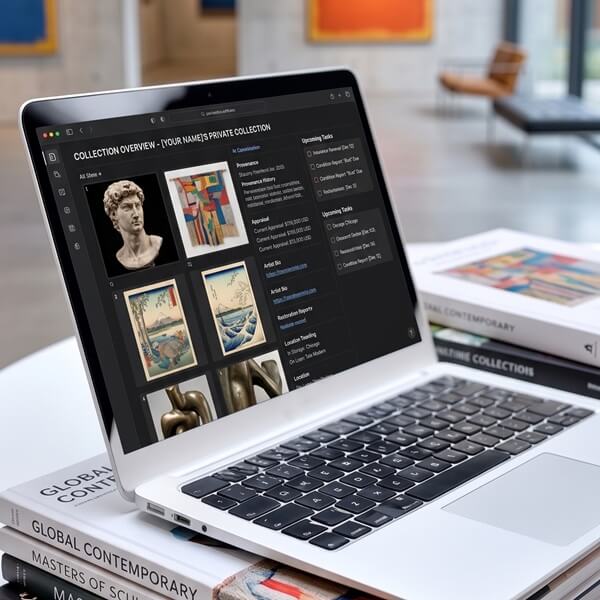
For a private collector, family office, or corporate collection using a corporate art management platform, art inventory software is a centralized, cloud-based database that stores everything about each artwork: artist, date, medium, dimensions, provenance, documents, valuations, locations, and contacts. It’s not the same as gallery software built around sales history and CRM, or museum systems with complex conservation workflows.
Historically, paper files and Excel worked fine for collections under 30 to 50 works in a single location. Beyond that threshold, data fragments. You end up with one spreadsheet for insurance, another for locations, photos scattered across a hard drive, and invoices buried in email. Art inventory software helps galleries showcase artworks to collectors, but the tools discussed here focus on private collectors, family offices, and small foundations. Modern systems emphasize user-friendly interfaces, guided data entry, and quick search. Moreover, adopting art collection database best practices ensures that key fields like medium, acquisition history, and provenance remain consistent across your catalog.

Features Every Art Collector Should Expect
Not every feature matters the same. Here’s a checklist of capabilities you should keep an eye on before committing to any platform:
Artwork cataloging. Cataloging features should track title, artist, medium, and dimensions beside acquisition date, purchase price, current value, series or edition, signatures, marks, literature references, and exhibition history. Inventory management software should feature customizable fields for different art types, whether you collect photography, sculpture, or works by emerging artists and established artists alike. Advanced search and filtering capabilities aid in managing large collections, letting you quickly find any record by artist name, year, location, or medium.
Location and inventory management. Location tracking logs where pieces are stored and their movement history. You need a dashboard that answers “where is everything?” and lets you filter by home, office, storage, consignment at galleries, or on loan to institutions. Keeping track of works across multiple sites is where spreadsheets break down, and relying on workflows for tracking art across multiple locations helps answer “where is everything?” in seconds.
Provenance and document management. Document management facilitates secure upload of certificates and invoices, along with bills of sale, condition reports, conservation reports, and shipping documents as PDFs, photos, and notes attached to each record. Condition reporting tools document damages and conservation notes with before-and-after images. High-resolution image storage allows multiple views and documentation per artwork, including thumbnail images for quick browsing.
Insurance and valuation tracking. Valuation tracking monitors acquisition prices and current market appraisals, and many corporate collections rely on accurate art evaluation for financial reporting and insurance. Track insurer name, policy numbers, coverage limits, last appraisal date, and valuation history with dates. Art inventory software tracks the current market value of collections, which matters because 72% of collectors in 2025 consider valuation services essential when working with wealth managers. Insurance tools help assess coverage needs for art collections. Specialized insurers like AXA offer art insurance policies for collectors, and Hiscox provides art insurance policies for collectors, so your records must be export-ready for whichever broker you use.
Private rooms and secure sharing. Effective software allows for sharing selected artworks securely without exposing the entire database. Online viewing rooms provide interactive experiences for collectors and advisors. Virtual exhibitions allow galleries to reach global audiences, and virtual exhibitions are increasingly necessary in the digital art world for both public and private presentations.
Reporting, export, and mobile access. One-click export of inventory lists, insurance schedules, and condition checklists in PDF or CSV formats saves time during renewals and loan preparation. Mobile accessibility allows collectors to view records and update data on-the-go, whether you are at an art fair, a studio visit, or receiving a shipment.
Cloud-Based vs. Desktop: Security, Privacy, and Access
Traditional desktop software stores data on one computer or a local hard drive. Cloud based inventory software runs in a browser or app, syncing across every device you use. For collectors with multiple properties or organizations with distributed offices, the advantages of cloud-based art collection management are: an update in Chicago reflects instantly in London.
Data security features should include encryption and cloud backup options. Leading platforms use TLS for data in transit, AES-256 encryption at rest, multi-factor authentication, and role-based permissions so an advisor can view a valuation but not your acquisition cost. Secure cloud storage ensures your entire archive is backed up across multiple data centers. Cloud-based platforms help protect and preserve art collections far more reliably than an unencrypted spreadsheet on a single laptop. Digital storage solutions prevent data loss for art collectors by building in redundancy that local storage cannot match.
Consider this scenario. A collector’s pipe leak in January 2025 damages several works. Using a phone app, they retrieve invoices, condition reports, and valuation history while standing in the affected room, giving the insurer everything needed to process the claim immediately. That kind of access matters when every hour of delay increases exposure.
Serious private collectors avoid public exposure of their holdings. Look for the ability to disable public profiles, use invite-only sharing links, and restrict who sees purchase details. Ask any vendor about their encryption protocols, backup frequency, data center jurisdiction, and incident response plan before you commit.
How Art Inventory Software Fits Into a Collector’s Workflow
1. Acquisition & Intake
On the day you purchase or receive a work, log it: capture photos from your phone, enter the artist, title, year, medium, and dimensions, upload the dealer invoice and shipping documents. This prevents records from getting lost in email and ensures the provenance chain starts cleanly. Provenance tracking maintains a chronological record of ownership and exhibition history from day one.
2. Ongoing Care
Schedule condition checks every 12 to 24 months. When a work goes to a conservator, log the conservation report with before-and-after images, cost, and contractor details. Provenance documentation tracks the ownership history of artworks, and digital tools enhance the accuracy of provenance documentation over time. Provenance helps verify the authenticity of artworks, and proper provenance documentation can increase an artwork’s market value.
3. Loans & Movements
Loan tracking features are essential for managing art collections. Asset tracking for loans is important for managing engagements with galleries and museums. Create a loan record with outgoing and incoming condition reports, shipping details, insurance coverage, and reminders for end dates. Organizations can streamline records and track loans with software rather than chasing emails. Art management tools simplify documentation for loan tracking across multiple exhibitions.
4. Deaccession & Gifting
When selling, generate a provenance packet for potential buyers that includes full ownership history, exhibition records, literature, and authenticity proof. For charitable donations, summarize fair market values and track capital gains based on stored acquisition and sales data.
Common Mistakes Collectors Make (and How to Avoid Them)
Even sophisticated collectors fall into predictable traps when adopting art inventory software.
- Half-cataloging. Entering title and artist but skipping invoices, condition notes, and provenance creates gaps that surface during insurance claims or estate planning. Use templates and data checklists to maintain detailed records from the start.
- Single-person dependency. If one assistant is the only person who understands the system, you are vulnerable when that person leaves. Document workflows, assign more than one admin, and train family office staff on the platform.
- Mixing ownership entities. Combining works owned personally, through a trust, and by a corporate entity in one unstructured database complicates tax reporting and legal clarity. Use separate collection tags or entity fields and export reports filtered by ownership.
- Choosing on price or presentation alone. A slick website or low cost may hide limitations in document storage, export formats, or audit trails. Focus on long-term, stable recordkeeping and organized documentation over surface appeal.
- Skipping backups. Even in a cloud based system, schedule quarterly data exports and keep local archive copies of critical documents on a secure hard drive or secondary cloud site.
How to Choose the Right Art Inventory Software for Your Collection
The right tool depends on your collection size, number of locations, compliance needs, and how many people need access to the art inventory.
Evaluation criteria to test during a trial:
- Maximum artworks and images supported
- Flexibility of custom fields for your specific collection types
- Quality of search and filters across your database
- Ability to manage multiple entities (personal, family trust, corporate)
- Performance with large image files and document attachments
Test user friendly claims directly: time how long it takes to add a new artwork with at least 10 key fields and 3 documents. If it takes more than a few minutes, the platform may slow you down at scale.
Cost structures range from per-user pricing to per-collection tiers. Entry-level programs for individual collectors start around $7.99 per month, while enterprise-level platforms for family offices and organizations using feature-rich corporate art management software scale into four figures. Optional add-ons like advanced analytics, API access to connect with accounting systems, or virtual exhibition tools often cost extra.
Ask about data portability before you pay. Confirm you can export your full artwork archive, including images and documents, in standard formats like CSV or JSON. Test the import process from your existing spreadsheet or system. Check whether onboarding, migration assistance, and ongoing training for your organization are included or billed separately.
Best Practices to Keep Your Art Collection Records Accurate Over Time
Software is the tool. Discipline keeps records reliable.
- Annual inventory review. Verify locations, update values for significant market trends, and confirm insurance coverage limits match current valuations. Maintaining accurate records year over year is what separates a managed collection from a liability.
- Document every movement. Any time a work leaves or enters a property for new framing, conservation, loan, or relocation, log the date, reason, and responsible person in the system.
- Standardize naming and formats. Create simple rules: artist names as “Last, First,” consistent date formats, file names like “Lastname_Artist_Title_Invoice_2024.pdf,” and uniform tags for period, medium, and subject.
- Collaborate with advisors. Share limited, read-only access or curated private rooms with art advisors, insurers, estate attorneys, and accountants so everyone works from the same data, and consider learning from resources on strategic management of corporate art collections if your holdings function as a business asset.
- Plan for succession. Use inventory software to give heirs a clear, documented view of the collection. This reduces disputes and forced sales during estate transitions.
FAQs
How many artworks justify investing in art inventory software?
Once your collection reaches around 30 to 40 works with meaningful financial or emotional value, or spans more than one physical location, inventory software saves time and reduces risk. Collectors with fewer pieces still benefit if each work is high-value or the collection is growing quickly. For example, a collector who started at 25 works in 2022 passed 75 by 2025, makes the early investment worthwhile.
Can I migrate my existing spreadsheet into an art inventory system?
Most platforms accept CSV imports. You export your existing data, map columns like artist, title, year, and purchase price to the new system’s fields, then manually attach documents afterward. Messy or inconsistent spreadsheets may need a few hours of cleanup before import. Treat migration as an opportunity to standardize naming and fill missing provenance details rather than copying errors forward.
How secure is cloud-based art inventory software for high-value collections?
Reputable platforms use encrypted connections, encrypted database storage, and separate media storage for images with regular security audits. Look for multi-factor authentication, role-based permissions, and logs of who viewed or edited records. Artwork Archive offers top-level security for art collections, for example. In most cases, a professionally managed cloud platform is more secure than one unencrypted laptop.
Can I track multiple collections or ownership entities in one system?
Advanced inventory software lets you define multiple collections, ownership entities, or locations and assign each artwork accordingly. This matters for tax and legal clarity when some works are personally owned while others belong to a foundation or corporate entity. Confirm your chosen platform can filter reports and export by owner or entity for clean insurance schedules and advisor reports.
Do I need professional photography before entering works into inventory software?
Start with whatever images you have, even phone photos, to ensure every piece is captured. Replace casual images with professional photography over time, especially for high-value works that may appear in publications or sales packets. Missing images are a frequent weak point in older inventories, so imperfect photos are always better than no photos.
How much time does it take to set up an art inventory for an existing collection?
A 50-piece collection might take a dedicated weekend for a hands-on art collector, while a 300-piece collection may require several weeks part-time. Start with a triage approach: input basic records for every work first, then loop back to add provenance documents and detailed notes. Some collectors hire registrars or consultants to assist with initial cataloging when the collection is large or historically complex. Artwork Archive offers a free 14-day trial for those who want to explore the process before committing. AIt also allows them to generate reports for insurers and allows collectors to record provenance details in the platform. Moreover, Artwork Archive helps track loans for organizations managing distributed collections. Artwork Archive generates reports for insurers and advisors across multiple reporting formats.
Why Choose an Art Inventory Platform for Your Collection
Tools like spreadsheets or generic document storage do not address art-specific needs around provenance, valuation, and secure sharing. An art inventory platform is built around condition reporting, exhibition history, loan tracking, and location management across homes and storage facilities.
For collectors and family offices, the benefits are: time saved when working with insurers and advisors, reduced risk of missing documentation, and a clearer view of the collection as both a financial and cultural asset. Data analytics tools help galleries and collectors understand buyer behavior and market performance. Analytics provide insights into market performance of artworks that inform decisions about acquisitions and deaccessions. Research shows that 10% to 15% more revenue comes from tailored customer offerings driven by collection data. Art inventory software helps you stay ahead of market trends and make informed decisions about your art business and portfolio.
Organizations using platforms report smoother insurance renewals, fewer last-minute document hunts before loans and sales, and better collaboration with the people who help manage the collection. The value is not in the technology itself but in the control it gives you over every work you own.
Take the Next Step with Your Art Collection
Treat your art inventory as a core part of responsible collecting! Art moves quickly, and whether you track work by emerging artists or manage pieces by established ones, your records need to keep pace.
So audit your current records. Define what you need to track: artworks, locations, provenance, insurance, private rooms for sharing with advisors. Shortlist 2-3 inventory software options and run a trial. Involve key stakeholders early, including art advisors, family office staff, and insurers, so the system you choose supports everyone.
Ready to explore what modern art inventory software can do for your collection? Request a demo from a provider you trust, or block time this month to begin properly cataloging your art collection. The best time to start was years ago. The second best time is now.