Table of Contents:
- What is Art Inventory Software?
- Why Spreadsheets Fail Serious Collectors
- Essential Features for Art Management
- Top Software Comparison: 2026 Overview
- Best Tools for Individual Collectors
- Best Platforms for Galleries & Institutions
- Why Onward Leads in Corporate Collection Management
- Choosing Your Software: Key Evaluation Questions
- A 30-Day Implementation Roadmap
- Getting Started with Onward
As art collections grow in value and complexity, managing them with spreadsheets or scattered records quickly becomes unsustainable. Whether you are an individual collector, a family office, or a corporate entity, the ability to track, protect, and optimize your assets requires a professional-grade digital solution.
This guide compares the top art inventory management software options and helps you choose the right platform for your specific needs—from simple cataloging to enterprise-level asset management. Picking the right art inventory management software comes down to matching those features to how your team actually works.
What is Art Inventory Software?
Art collection inventory management software is a specialized collection management system designed to help individuals and organizations catalog, track, and manage artworks as structured assets rather than scattered records. At its core, art collection inventory management software centralizes key information—such as artist details, provenance, valuation, location, and documentation—into a single, organized platform.
Unlike basic tools, modern art collection inventory management software enables users to create detailed artwork records, attach high-resolution images and documents, track movements between locations, and generate reports for internal use, insurance, or compliance. This transforms art from a loosely documented collection into a fully managed asset class with clear visibility and control.
The need for art collection inventory management software varies across audiences but becomes increasingly critical as collections grow in size and value. Private collectors often start with simple tracking methods but quickly require more structured systems. Family offices manage art as part of a broader investment portfolio, requiring transparency and oversight. Corporations must track artworks across multiple offices, while galleries and institutions handle loans, exhibitions, and public-facing operations.
A key distinction lies between basic cataloging and full asset management. While cataloging focuses on listing artworks, true art collection inventory management software provides advanced capabilities for tracking, reporting, and analysis. Most modern platforms are cloud-based, allowing real-time collaboration across teams and locations—an essential feature for distributed collections.
As collections expand in complexity, art collection inventory management software becomes not just helpful but essential. It enables better control, reduces operational and financial risk, and supports more informed decision-making across the entire lifecycle of an art collection.
Why Spreadsheets Fail Serious Collectors
Spreadsheets have long been the default tool for managing art collections, but they are fundamentally limited when applied to complex, high-value assets. While they may work for small collections, they quickly become inefficient and error-prone as data grows.
The primary issue is fragmentation. Information is often spread across multiple files, email threads, shared drives, and even physical records. This leads to inconsistencies, duplicated entries, and difficulty in maintaining a single source of truth. Without centralized control, updates are easily lost, and data becomes unreliable over time.
Another major limitation is the lack of real-time collaboration. When multiple users are involved, version control becomes a challenge, increasing the risk of overwriting or losing important information. This is especially problematic for organizations where multiple stakeholders need access to accurate, up-to-date records.
Spreadsheets also lack structured reporting and analytics. Answering key questions—such as total collection value, artwork distribution by location, or loan status—requires manual effort and often leads to incomplete or outdated insights. For high-value collections, this creates both operational inefficiencies and financial risks, particularly in areas like insurance, audits, and compliance.
Scalability further compounds these issues. Managing artworks across multiple locations requires constant manual updates, increasing the likelihood of errors. Additionally, spreadsheets cannot effectively integrate images, documents, and metadata into a unified system, making it difficult to view complete artwork records.
Ultimately, spreadsheets are static tools attempting to manage dynamic, evolving collections. As the complexity of a collection increases, transitioning to a dedicated art collection inventory software becomes essential for maintaining accuracy, efficiency, and control.
Essential Features for Art Management
Selecting the right art inventory management software requires focusing on features that support both daily operations and long-term collection management. The most important capability is a centralized inventory database that allows users to catalog artworks with structured, searchable data.
Beyond basic cataloging, effective systems integrate document and image management directly into each record. This ensures that invoices, certificates, condition reports, and visuals are all accessible in one place, eliminating the need for separate storage systems. Location tracking is another essential feature, particularly for collections spread across offices, storage facilities, or exhibitions, as it provides real-time visibility into where each artwork is located.
Loan tracking is equally important for organizations that frequently move artworks. Being able to monitor loan status, timelines, and responsibilities reduces risk and improves coordination.
Advanced features further distinguish professional-grade platforms. Analytics and reporting capabilities enable users to generate insights into collection value, distribution, and activity, transforming raw data into actionable information. Multi-user permissions allow teams to collaborate securely, while private sharing tools make it possible to provide controlled access to external stakeholders such as appraisers or insurers.
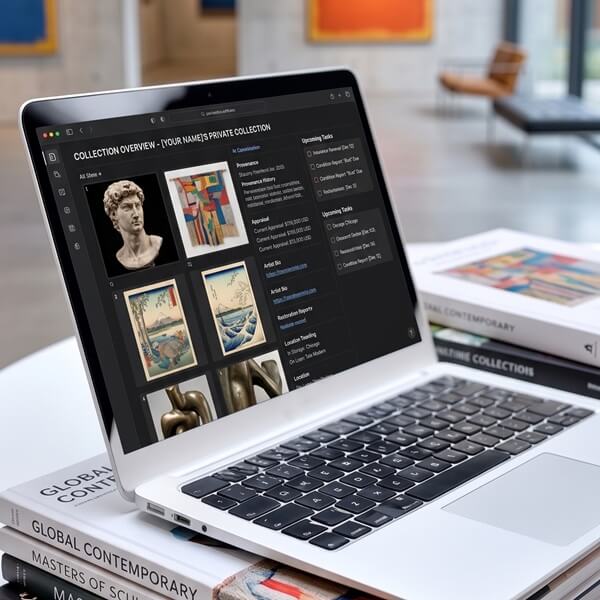
Ease of use plays a critical role in adoption. A system that requires minimal training ensures that teams can quickly integrate it into their workflows. Cloud-based platforms offer additional advantages, including accessibility from any location and seamless collaboration.
Ultimately, the best systems combine robust functionality with simplicity, allowing users to manage collections efficiently without unnecessary complexity.
Top Software Comparison: 2026 Overview
The market for art collection inventory software includes a range of tools designed for different types of users. Some platforms prioritize simplicity and accessibility, while others focus on advanced features and enterprise-level capabilities. The market is split between tools for artists, tools for galleries, and tools for collectors. Below is a comparison of the current leaders.
| Software | Target User | Key Strength | Primary Limitation |
| Onward | Corporate/Enterprise | Built for multi-location & >$10M collections | Focuses on management, not sales/CRM |
| Artwork Archive | Individual Collectors | Extremely easy to use and affordable | Can feel limited for complex institutional needs |
| Artlogic | Professional Galleries | Comprehensive sales and website integration | High learning curve and higher price point |
| CatalogIt | Small Museums | Highly mobile-friendly and flexible | Interface is less “luxury” than competitors |
| Art Galleria | Mid-size Galleries | Strong sales pipeline and website sync | Reporting can be clunky for large estates |
Best Tools for Individual Collectors
For individual collectors and small teams, the primary focus is on simplicity, affordability, and ease of use. Tools like Artwork Archive and CatalogIt are designed to provide a streamlined experience, allowing users to catalog artworks quickly without extensive setup or training.
These platforms typically offer intuitive interfaces and mobile-friendly access, making it easy to manage collections on the go. They are particularly well-suited for users who need to organize a growing collection but do not require advanced analytics or complex workflows.
However, as collections expand, limitations begin to emerge. Reporting capabilities are often basic, and managing artworks across multiple locations can become challenging. Collaboration features may also be restricted, making it harder for teams to work together effectively.
For smaller collections, these tools provide a practical starting point. But for users anticipating growth or increased complexity, it is important to consider whether the platform can scale alongside their needs.
Best Platforms for Galleries & Institutions
As collections grow, the need for more advanced systems becomes evident. Platforms such as CatalogIt, Art Galleria, and Artlogic offer enhanced functionality designed for multi-user environments and more complex workflows.
These systems support collaboration across teams and often include features tailored to galleries, such as CRM tools and sales tracking. They also provide more comprehensive inventory management capabilities, allowing users to handle exhibitions, loans, and client interactions within a single platform.
However, this added functionality often comes with increased complexity. Users may need additional time for onboarding and configuration, and the interface may not be as intuitive for non-commercial use cases. For institutions, platforms like ArtPro offer even deeper functionality but require significant setup and training.
While these tools are powerful, they are not always optimized for corporate or distributed collections, where ease of use and centralized visibility are critical.
Why Onward Leads in Corporate Collection Management
Onward stands apart by focusing specifically on corporate, institutional, and family office collections over $10M. Unlike general-purpose tools, it is designed from the ground up to manage distributed collections across multiple locations.
The platform emphasizes simplicity without sacrificing functionality. Its intuitive interface allows teams to adopt the system quickly, while its centralized structure ensures that all data is connected and accessible. This makes it particularly effective for organizations that need to maintain visibility across offices, storage facilities, and exhibitions.
Onward also provides strong analytics and reporting capabilities, enabling users to understand their collection at a strategic level. Location and loan tracking are built into the system in a way that supports real-world workflows, rather than requiring manual workarounds.
Compared to generic tools, Onward offers a more focused approach. It avoids unnecessary complexity and instead prioritizes clarity, usability, and business relevance. This makes it especially valuable for organizations that view art as both a cultural and financial asset.
Choosing Your Software: Key Evaluation Questions
Before migrating your data to a new platform, we recommend asking these five critical questions:
- Onboarding Speed
How long does it actually take to go live? Some systems take months to configure; others can be ready in days.
- Data Portability
Is your data “locked in,” or can you export everything to a CSV or PDF immediately if you decide to change platforms?
- Security Protocols
Does the provider use bank-level encryption and require multi-factor authentication (MFA)?
- Training Requirements
If your staff turns over, will you be hit with expensive fees to train new employees on a complex system?
- Collaborative Sharing
Can you create “Private Rooms” to securely share specific works with an insurance agent or board member?
A 30-Day Implementation Roadmap
| Timeline | Phase | Key Actions |
| Week 1 | Audit & Requirements | Narrow down your “must-have” features and pull together a small sample of your current data. |
| Week 2 | Comparative Demos | Schedule 2–3 demos. Pay close attention to how each platform handles Location Management and Report Generation. |
| Week 3 | The Pilot Phase | Upload your sample data into your top choice. Test the mobile app and see how quickly you can generate an insurance schedule. |
| Week 4 | Final Implementation | Finalize your subscription, import the full dataset, and invite your team members. |
Getting Started with Onward
Managing a world-class collection should feel like a privilege, not a chore. Onward was designed to strip away the technical complexity of traditional databases, allowing you to focus on the art itself.
Ready to upgrade your collection management?
- Upload. Bulk import your existing records via CSV or spreadsheet.
- Map. Assign works to specific locations globally through a simple interface.
- Collaborate. Invite team members with custom, granular permission levels.
- Analyze. Generate your first comprehensive valuation report with one click.
Request a guided tour of Onward today or start with a pilot to see why the world’s leading organizations trust us with their most valuable assets.